Build offline-first apps to earn trust in AI SaaS slop era.
Living in the slop era
I have SaaS fatigue.
Every piece of your data is on a server somewhere. If it’s not sold to advertisers or for AI training, it’s just a matter of time before it falls victim to a data breach with the same result. For that reason, when I’m developing my own software, like the Gecko Budget Android app, I started designing it with an offline-first principle in mind.
At first, it was just a hobby/portfolio project, but at some point I got convinced to publish it on Google Play. During a closed testing phase with family and friends, a few people raised a concern about enabling notifications listener permission: “I don’t want you to read my notifications”.
People already have grown to assume that app creators have access to their data. They don’t care that much when it’s a big corporation like Google, because they “already know everything”, but with a small app, it gets personal. The feeling they get is not like a city camera on top of the building anymore, but like a suspicious looking person following you around. Even if you know them.
How to prove that your app doesn’t send any user data?
Source code itself is not a great proof when publishing on Google Play. Yes, you can do reproducible builds, but an average user is never going to verify this. Unless your app is popular and audited by a third party (and your grandma can understand an audit article), this means nothing to normal humans.
Also, publishing source code of the app you worked on for months or years might not be the best idea in the age of AI and slop. What’s stopping bots and agents from forking your work and spinning up their own version? Nothing. You can say licencing, but you are not going to sue, because you have a life and no lawyers.
While cloning popular open source projects won’t really harm the original project, your small project might not be able to compete with clones to addition to vibe slop that is already out there.
We have to use something different to prove that our app won’t send any user data to your server, some cloud or advertising platform. A method that is simple and quick to verify by anyone, even non-technical users.
On Google Play there is a section talking about privacy and how user data is processed. The problem is that this section is just a self-declaration. There is no substance behind it, Google will not and can’t verify this. It’s just a promise and there is no reason to trust it. So how to actually prove that the app doesn’t send any data in a way anyone can quickly verify?
Building offline-first apps
How can a program share user data with whoever the developer wants? Using some kind of transportation protocol suite, like the Internet. You probably can see where I’m going with this:
If the app CANNOT access the internet, it can’t exfiltrate any data directly, without user action. Android enforces this at the Linux kernel level.
On Android, this can be achieved by not requesting the INTERNET permission in the app manifest.
<uses-permission android:name="android.permission.INTERNET" />
Remove that and your app cannot access the internet and push any data outside the device. Yes, there are other ways like system clipboard, intent extras etc., but this goes into the realm of security research and malware. Your neighbor will stop listening to you at this point. We just want to give a reasonable assurance to the user.
The problem with internet permission is that it requires no consent, it is granted by default by the OS (unless you have GrapheneOS, where you can opt out), so an app developer can add it later silently, without informing the users. The only thing you can do to dispel this doubt is to instruct them to disable automatic updates for your app. They will still receive notifications when the update is available, and they can check if the permissions changed, before updating.
You probably want to ask: “But how my app can work without internet access? I need it for backend integration/services/api” calls!”. There are alternative ways to get the data from the outside world that aren’t too obnoxious for the users, but that is a topic for another blog post.
How anyone can quickly verify that your app complies with offline-first principle?
Before we go into that, remember - we want to convince non-technical users to trust your indie app with their data.
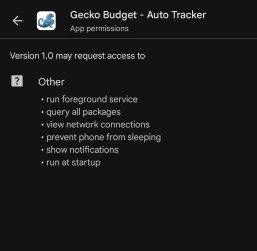
Encourage users to check other apps permission first. 99% of them will have internet permission listed as “have full network access” in “All Permissions” section of the app details info in Play store.
Then, ask them to check your app and compare. It’s relatively easy, so privacy conscious user might be willing to do this.
You can make it easier by starting an activity with intent action Settings.ACTION_APPLICATION_DETAILS_SETTINGS. This will open the app details page in Android settings.
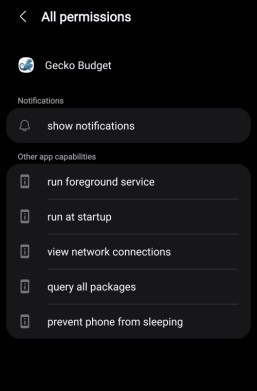
Alternative way, maybe more convincing for some users is to use Google Play store by tapping on About this app -> App permissions (see more) button. This way they can validate your claims before installing anything.
Moving away from the SaaS model
We rely on the cloud APIs too much - Firebase, AWS, Azure, etc., but these are not free so this is one of the reasons why so many modern apps require a subscription. I often see people promoting simple apps for note-taking, budgeting, journaling, etc., but they require a subscription to use and offline functionality is limited or not present at all.
I really hate this trend.
As we moved from desktop software to mobile-first apps, we should start designing our apps as offline-first. Most of us aren’t building next the social media or messaging apps. In my hobby project, Gecko Budget, I used the Capacitor native runtime library to build it with Angular that I already know as a Web Developer.
Capacitor offers sqlite database with jeep-sqlite plugin for web version. I worked as a fullstack at some point, so I felt back at home writing SQL queries again. It’s fast and a joy to work with. All the data stays on the device.
Then I’ve implemented a JSON export and import solution that users can pair with their cloud storage of choice, like self-hosted Nextcloud (self-hosting is growing in popularity, I wonder why). There is no need to handle user data if they can handle it themselves. Enable automatic file export, point the folder to your Nextcloud sync folder and you are done.
This is the real privacy-first approach to app development. 120% GDPR-compliant.